Focus on work, not your status
A native menu-bar / system-tray app that keeps you appearing active on Teams, Slack, and Discord. No mouse jiggling. No scripts. Just works.
Watch how Active Now keeps you green while you focus on what matters
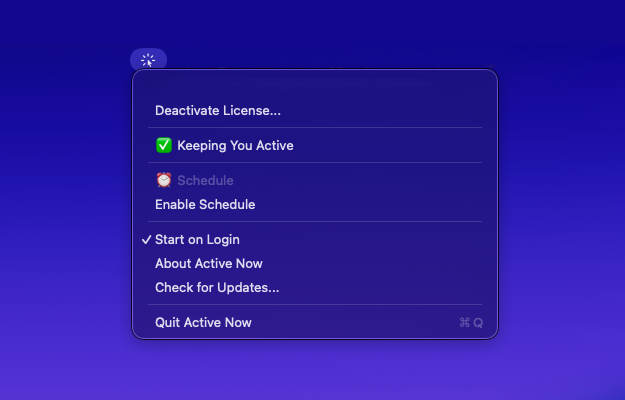
Look for the Active Now icon in your menu bar (Mac) or system tray (Windows). That's your command center.
Click the icon to see if you're "Idle" or "Active". Know exactly what your colleagues see.
Hit "Stay Active" and you're done. Your computer stays awake, you stay green.
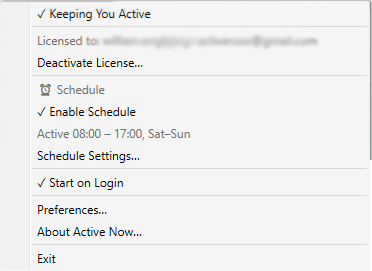
Only want to stay active during work hours? Set a schedule and it runs automatically โ weekdays, everyday, or custom days.
Real work doesn't always mean clicking. Status systems haven't caught up.
Set your hours and days. Runs automatically during work time, off after.
Lives in your Mac menu bar or Windows system tray. Always one click away, never in your way.
Configure once, runs forever. Launches automatically when you sign in.
Because IT can detect them. And they're janky.
| Active Now | Mouse Jigglers | Scripts | |
|---|---|---|---|
| Native Mac & Windows app | โ | โ | |
| Menu bar / system tray access | โ | โ | |
| Schedule support | โ | โ | |
| No physical device needed | |||
| Undetectable by IT | varies | ||
| No fake mouse movement | |||
| Auto-updates | โ | โ | |
| Signed & notarized | โ | โ |
Active Now uses native power-management APIs — the same system calls that video players use to prevent sleep during playback. No mouse jiggling, no fake keypresses, no suspicious patterns. Your computer just thinks you're watching a video.
One-time purchase. Yours forever.
One license, two platforms — install on Mac and Windows up to your device limit.
Already purchased?
โ You're on the waitlist! Check your email for confirmation.
Everything you need to know about staying active professionally and productively.
Teams automatically sets your status to "away" after 5 minutes of inactivity to indicate you're not actively using your computer. However, this doesn't account for legitimate work activities like reading documents, thinking through problems, or taking natural breaks - all essential parts of productive work.
No. Active Now uses native power-management APIs — it just tells your computer not to sleep. There's no mouse movement, no fake clicks, nothing that could interrupt what you're doing. You won't even notice it's running.
Yes! "Active Now" prevents your computer from going idle at the system level, which keeps your status active in Teams, Slack, Discord, Zoom, and any other communication apps that rely on system activity detection. One solution for all your workplace apps.
"Active Now" simply prevents false "away" statuses when you're legitimately working. You're not faking activity - you're correcting inaccurate status detection that doesn't understand modern work patterns. Many professionals use similar tools to maintain accurate presence indicators.
Active Now has built-in scheduling. Set your hours and days (weekdays, weekends, or custom), and it only runs during those times. Outside your schedule, it turns off automatically.
Manual mouse wiggling is distracting and inconsistent. Active Now runs quietly in your menu bar (Mac) or system tray (Windows) — turn it on once and forget about it. Plus, you can schedule it to only run during work hours.
Active Now lives in your menu bar (Mac) or system tray (Windows) โ always one click away, never cluttering your dock or desktop, launching automatically when you sign in, and running efficiently in the background. It's the perfect home for a utility you'll use every workday.